
The best marketing automation software depends on the work you need to automate. Nurturing B2B leads, recovering ecommerce customers, connecting existing tools, and improving the path from an ad click to a booked appointment are different jobs. There is no universal winner—and a longer feature list does not automatically mean a better fit.
This 2026 buyer guide organizes platforms by use case rather than forcing them into one ranking. Start with your biggest workflow bottleneck, then compare the channels, data, operating effort, and follow-up each category requires.
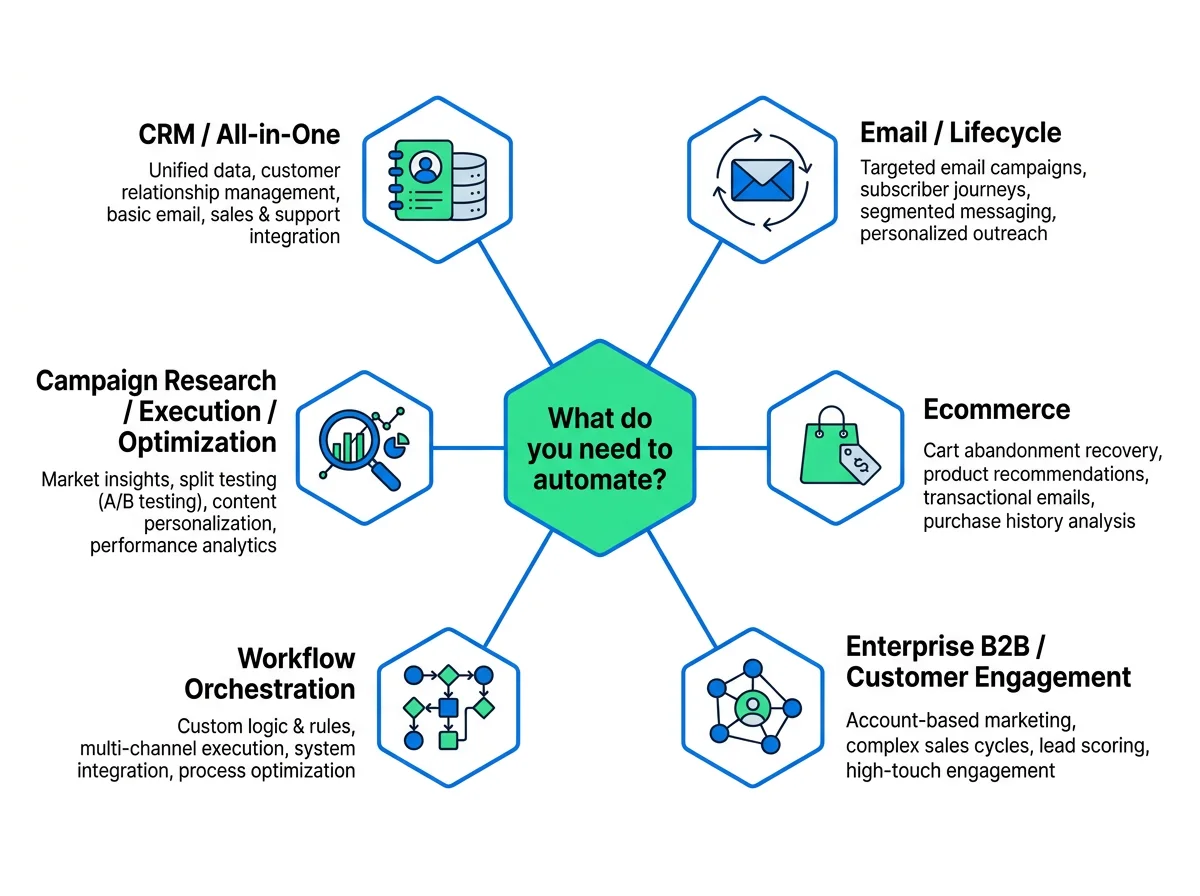
What should marketing automation software automate?
Marketing automation uses rules, triggers, and connected data to carry out repeatable marketing activities. A familiar example is a welcome sequence after someone subscribes. A broader workflow connects campaign planning, publishing, customer behavior, reporting, and sales follow-up.
Map the complete campaign loop before deciding how much of it belongs in one platform:
- Research and plan: identify audiences, buyer questions, keywords, and campaign angles.
- Build and publish: create assets and execute campaigns through the required channels.
- Segment and nurture: respond to customer attributes, behavior, purchases, or lead stages.
- Move data: connect marketing activity with CRM records and downstream actions.
- Measure and optimize: understand conversion paths and decide what to improve.
- Follow up: move interested prospects toward a purchase, sales conversation, or appointment.
You do not need one product to own every step. You do need a clear owner for each step—and a reliable handoff between them.
Best marketing automation software at a glance
Use this table to build a category-based shortlist. The decision questions are buying criteria, not claims that every platform has the same capabilities.
| Platform | Shortlist for | Key buying question |
|---|---|---|
| HubSpot Marketing Hub | CRM-centered marketing | Should marketing and sales work around the same CRM? |
| ActiveCampaign | Email and CRM automation | Is nurturing your main recurring workflow? |
| Customer.io | Behavior-based lifecycle messaging | Can your team supply meaningful customer events? |
| Klaviyo | Ecommerce lifecycle marketing | Will purchase behavior drive your segmentation? |
| Omnisend | Ecommerce messaging | Which store journeys need email or SMS follow-up? |
| Adobe Marketo Engage | Enterprise B2B demand generation | How complex are your sales handoffs and lifecycle rules? |
| Salesforce Marketing Cloud Account Engagement | B2B marketing and sales alignment | How should marketing fit your CRM operating model? |
| Braze | Customer engagement | What customer data will support your journeys? |
| Zapier | Cross-tool workflow orchestration | Which existing systems need to exchange data or actions? |
| Make | Cross-tool workflow orchestration | Who will build and maintain the connected workflows? |
| Superpage | Campaign research, execution, optimization, and appointment follow-up | Is acquisition-to-conversion your main automation gap? |
1. CRM and all-in-one marketing automation
Shortlist: HubSpot Marketing Hub and HighLevel. These belong in the all-in-one CRM category. ActiveCampaign also enters the conversation when email and CRM automation are the central need.
This category makes sense when the daily problem is coordination between marketing and sales: leads enter, records change, nurturing continues, and someone needs to take the next action. Start with the lead lifecycle rather than the campaign editor.
The tradeoff: shared context versus operational complexity
A CRM-centered approach brings the customer record into the automation decision. It also makes CRM design part of the marketing implementation. Ownership, lifecycle stages, duplicate records, and sales activity need clear rules.
- Good fit: teams whose recurring work connects lead nurturing with sales follow-up.
- Less suitable starting point: teams that only need a simple email sequence and have no broader CRM problem.
- Pilot workflow: capture a lead, apply a nurture rule, assign the next action, and track the handoff.
2. Email and behavior-based lifecycle automation
Shortlist: ActiveCampaign for email and CRM automation; Customer.io for behavior-based product messaging. Mailchimp and Brevo also belong in the email and CRM automation category.
Distinguish contact-based nurturing from event-driven lifecycle messaging. A sequence triggered by a form submission is different from a journey that changes when someone completes—or misses—a product action.
The tradeoff: journey flexibility versus data preparation
Behavior-based automation is only useful when the underlying events mean something. Define which actions signal activation, interest, inactivity, or completion. Otherwise, a sophisticated journey can automate the wrong message just as efficiently as the right one.
- Good fit: teams focused on onboarding, activation, nurturing, or retention.
- Less suitable starting point: teams whose main problem is creating and publishing paid-acquisition campaigns.
- Pilot workflow: enroll a customer after a meaningful action, branch on subsequent behavior, and exit when the goal is completed.
3. Ecommerce marketing automation
Shortlist: Klaviyo, Omnisend, and Drip. These platforms sit in the ecommerce lifecycle category, where purchase behavior and store journeys shape marketing decisions.
For an ecommerce operator, the useful comparison starts with customer and order data. Which journeys matter most: first purchase, repeat purchase, checkout recovery, or re-engagement? Then map the email and SMS requirements for those journeys.
The tradeoff: commerce specialization versus other funnel needs
Ecommerce specialization is relevant when purchases organize the customer lifecycle. It is a weaker starting point when your business depends on qualification, lengthy B2B nurturing, and sales-led opportunities rather than store transactions.
- Good fit: stores building purchase-based segmentation and lifecycle messaging.
- Less suitable starting point: B2B teams choosing a platform primarily for demand generation and sales alignment.
- Pilot workflow: create one purchase-based segment, run a relevant follow-up, and stop it when the customer takes the intended action.
Make store-data fit a first-round requirement. The relevant question is whether your customer and purchase records support the exact journey you want—not whether the platform has the most templates.
4. Enterprise B2B and customer engagement
Shortlist for B2B demand generation: Adobe Marketo Engage and Salesforce Marketing Cloud Account Engagement. For customer-engagement needs, Braze, Insider One, and Iterable belong in the comparison.
These are two related but distinct buying problems. B2B demand generation centers on the relationship between marketing activity and sales progression. Customer engagement centers on ongoing journeys shaped by customer behavior and context.
The tradeoff: lifecycle scope versus implementation demands
At this level, evaluate more than the person building campaigns. Include the people responsible for data, permissions, approval processes, sales operations, and reporting. A journey that crosses departments needs an operating model as well as software.
- Good fit: organizations with complex lifecycle needs and people assigned to operate them.
- Less suitable starting point: small teams solving one straightforward email workflow.
- Pilot workflow: run a cross-team journey with explicit ownership, data rules, approvals, and a measurable completion event.
Do not treat enterprise B2B automation and customer engagement as interchangeable. Shortlist against the actual journey, even when both appear under the same marketing automation label.
5. Workflow orchestration across existing tools
Shortlist: Zapier and Make. These are connective workflow layers rather than conventional email or campaign platforms.
Choose this category when you like your existing tools but the handoffs between them create manual work. Orchestration connects systems and actions; it does not automatically replace the CRM, messaging tool, or advertising platform that performs the underlying job.
The tradeoff: stack flexibility versus maintenance responsibility
Cross-tool workflows give you another way to organize the stack. They also need someone to manage field mapping, failures, changed inputs, and duplicate actions. Count that ongoing responsibility as part of the buying decision.
- Good fit: teams connecting established systems without starting over.
- Less suitable starting point: teams expecting an integration layer to create and manage the entire campaign itself.
- Pilot workflow: move one lead between systems, trigger the next action, and inspect what happens when an input is missing.
6. Campaign research, execution, and optimization
Superpage is a different type of marketing automation option: an AI marketing platform for researching, building, publishing, and optimizing campaigns across connected marketing tools.
This category is relevant when your bottleneck spans acquisition and conversion—not just the message sent after someone becomes a contact. Superpage connects campaign work with advertising, attribution-informed improvement, and appointment-setting follow-up.
- Campaign research, building, and publishing: supports a connected workflow from campaign planning through execution and optimization.
- Google Ads: supports keyword research and CAPI implementation.
- Meta Ads: supports Meta advertising.
- AI CRO: analyzes actual session recordings and first-touch and last-touch attribution data to identify conversion bottlenecks and recommend what to optimize next.
- AI Voice Agents: call leads as appointment setters.
The tradeoff: a broader campaign loop versus a narrowly defined need
Superpage belongs on the shortlist when the problem crosses research, advertising, conversion improvement, and lead follow-up. If your only requirement is purchase-based messaging or a connection between two existing applications, begin with those categories instead.
Superpage pricing and guarantees are not published. Compare its workflow fit without assuming a subscription cost or promised outcome.
For a practical pilot, define one acquisition-to-appointment journey. Identify the campaign inputs, advertising work, conversion data, optimization decision, and appointment-setting step. The aim is to evaluate the connected workflow, not assign Superpage a universal ranking.
How to choose the right platform
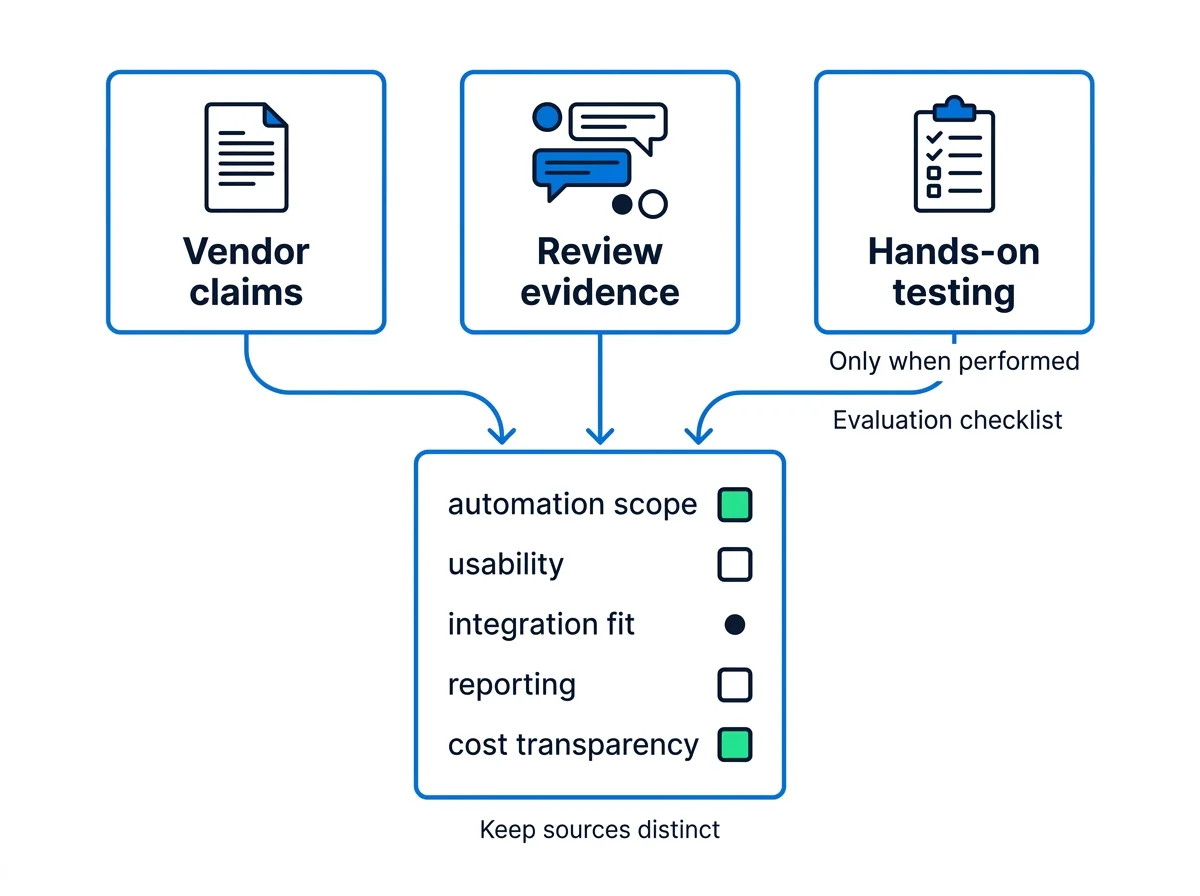
Apply the same checklist to every finalist. Keep the evidence behind an answer separate from the answer itself: a feature description, a customer experience, and an observed workflow tell you different things.
- Vendor-published claims describe intended capabilities and product positioning.
- Review evidence describes customer experiences, including usability and operating friction.
- Hands-on testing shows how a specific workflow behaves with particular data and conditions.
A vendor description is not a tested result. A positive review is not proof that your journey will work the same way. A successful pilot establishes the workflow tested, not every possible capability.
A consistent shortlist checklist
- Name the primary workflow. Write one sentence describing its trigger, actions, and completion event.
- Map required channels. Separate essential email, SMS, ads, product messaging, and calling needs from optional ones.
- Inventory your data. Identify the CRM fields, purchase records, customer events, or attribution inputs the journey needs.
- Choose the operating model. Decide whether the workflow should live around a CRM, a messaging platform, or connected tools.
- Assess automation depth. Examine branching, timing, exit conditions, and the handoff after a response—not just enrollment.
- Assign implementation and daily ownership. Include setup, monitoring, permissions, and maintenance.
- Define reporting and optimization. State what you need to learn and what action follows the result.
- Compare total cost at your expected scale. Include applicable contacts, sends, seats, usage, onboarding, and required services.
- Run one representative pilot. Include a normal path, an exception, and a completion event.
The best shortlist starts with a workflow you can describe—not a platform you have already decided to buy.
Common buying mistakes
- Choosing ecommerce software for a sales-led B2B lifecycle.
- Buying an enterprise suite for a simple email sequence.
- Confusing cross-tool orchestration with campaign execution.
- Designing behavior-based journeys before defining reliable events.
- Comparing entry prices without accounting for the scale of your usage.
- Treating all AI features as equivalent, regardless of their role in the workflow.
Keep the shortlist small: two or three finalists that solve the same primary problem. Comparing unrelated categories side by side usually produces more confusion than clarity.