
Your ad dashboard reports more conversions. Sales still wants to know where the qualified appointments are. That gap is where choosing the right conversion rate optimization tools becomes useful—not another dashboard, but evidence that helps you decide what to fix next.
A visitor can abandon before submitting, arrive with the wrong expectations, or submit and disappear before booking. Those are different leaks. This guide compares nine options by the problem they help investigate and the action that follows, rather than treating every marketing tool as an interchangeable CRO platform.
What conversion rate optimization tools actually do
Conversion rate optimization, or CRO, is the process of improving the path from a visitor to a desired action. CRO tools help you identify friction, understand conversion behavior, and evaluate changes to that path.
The desired action matters. For an online store, it might be a purchase. For a service business or B2B team, it might be a qualified application or booked consultation. A higher form-submission rate is not automatically a better result if fewer submissions become sales-ready conversations.
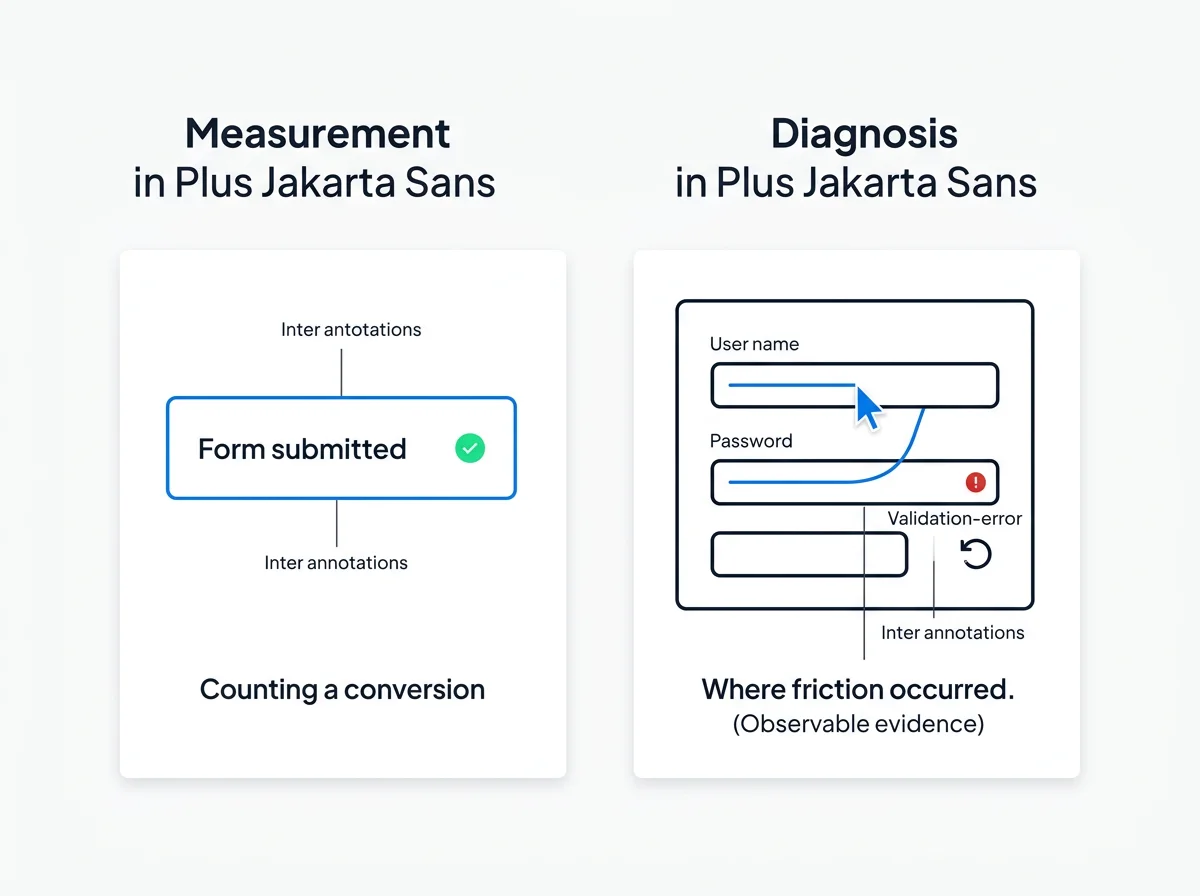
Measuring a conversion tells you that an event happened. Diagnosing it helps explain what encouraged—or prevented—the next step.
An aggregate report can identify a page with low conversion. A session recording can reveal someone repeatedly clicking an unclear button or stopping at an unexpected question. A CRM record can reveal that a successful submission never received follow-up. Each answers a different question.
That also sets the boundaries of the category. Broad analytics measures activity and outcomes. Standalone attribution allocates credit among touchpoints. CRM software manages contacts and sales progress. Page builders change the experience. Each can support CRO, but none automatically explains the entire conversion leak.
Nine options, organized by the leak you need to investigate
This is a use-case shortlist, not an exhaustive ranking. Start with the question you cannot currently answer; then choose the type of evidence or operational response you need.
| Option | Primary evaluation use case | Next decision |
|---|---|---|
| Microsoft Clarity | Session recording and behavior analysis | Which interaction needs attention? |
| FullStory | Digital experience and session analysis | Where does the journey become difficult? |
| Hotjar | Behavior analysis and visitor feedback | What friction should become a hypothesis? |
| Contentsquare | Digital experience analysis | Which experience deserves investigation? |
| Google Analytics 4 | Traffic and conversion-event context | Which sources and paths underperform? |
| VWO | Experimentation | Does a proposed change improve the outcome? |
| Optimizely | Experimentation | Which variation performs better? |
| WhatConverts | Lead tracking and attribution context | Which acquisition activity produces useful leads? |
| Superpage | Actual session recordings and first-/last-touch attribution | What needs attention between paid traffic and qualified appointment follow-through? |
1. Microsoft Clarity: investigate visible interaction friction
Microsoft Clarity is a session-recording and behavior-analysis option. It fits the question, “What are visitors doing on this page?” Use session evidence to investigate confusing interactions, repeated attempts, and abandonment before deciding which element to change.
Decision boundary: observing a difficult interaction does not establish lead quality or explain what happened after submission. Pair the finding with the outcome you actually care about.
2. FullStory: investigate the digital experience
FullStory belongs in the digital-experience and session-analysis category. Consider it when the problem is understanding how visitors move through a journey and where their experience breaks down.
Decision boundary: detailed behavioral evidence still needs a specific hypothesis and an owner. Watching more sessions is not a substitute for prioritizing a fix.
3. Hotjar: connect observed behavior with visitor questions
Hotjar is a behavior-analysis and visitor-feedback option. It is relevant when you need to investigate both what people do and the questions or objections that could explain their hesitation.
Decision boundary: feedback and observed behavior are different kinds of evidence. Use them together to sharpen a hypothesis, rather than assuming a stated preference predicts conversion.
4. Contentsquare: examine experience-level friction
Contentsquare is a digital-experience analysis option. Its category is relevant when your CRO problem involves understanding the experience across a broader visitor journey, rather than counting one conversion event.
Decision boundary: match the scope of your analysis to the team's capacity. A lean team with one underperforming campaign needs a focused investigation, not an open-ended reporting project.
5. Google Analytics 4: locate the quantitative problem
Google Analytics 4 provides traffic and event-based analytics context. It is useful for locating differences between sources, campaigns, pages, and conversion activity—the quantitative starting point for a CRO investigation.
Decision boundary: an event count identifies an outcome, not the reason behind it. Use behavior evidence to investigate the path and downstream records to distinguish submissions from qualified demand. For the wider reporting question, see our guide to marketing analytics tools.
6. VWO: evaluate a change through experimentation
VWO is an experimentation option. It fits a later-stage question: you have identified a problem and developed a hypothesis, and now want to compare experiences against a defined outcome.
Decision boundary: testing requires enough relevant conversion activity, disciplined measurement, and time to interpret results. Buying an experimentation platform does not create a good hypothesis.
7. Optimizely: support an experimentation program
Optimizely is another established experimentation option. Include it in your evaluation when controlled comparisons are central to your optimization process and the team can implement and manage that work.
Decision boundary: experimentation is one CRO method, not the definition of CRO. A broken submission or missed follow-up can deserve direct attention without a variation test.
8. WhatConverts: investigate acquisition-to-lead outcomes
WhatConverts sits in the lead-tracking and attribution category. It is relevant when your main question is which marketing activity produces leads, and whether lead volume reflects useful demand.
Decision boundary: knowing where a lead came from does not explain why another visitor abandoned. Attribution context and session evidence serve different jobs.
9. Superpage: connect CRO analysis with appointment follow-through
Superpage supports CRO analysis using actual session recordings and first-touch and last-touch attribution. Google Ads and Meta Ads provide the paid-media context; CRM and workflow automation support lead follow-through; outbound AI voice agents support appointment setting.
This makes it relevant to operators investigating the path from paid traffic to a booked conversation. The evaluation should focus on the evidence you can inspect and the follow-through your appointment process needs.
Decision boundary: keep the target outcome explicit. A submitted form, a qualified lead, and a booked appointment are separate milestones, even when they belong to the same acquisition journey.
The five CRO jobs—and why they are different
Behavior analysis: what did the visitor do?
Aggregate reports expose patterns; actual session recordings expose individual paths. Look for repeated attempts, backtracking, hesitation around a question, or abandonment before a clear next step. Use these observations to identify a likely friction point, not to claim you know every visitor's motivation.
Attribution: which touchpoints contributed?
First-touch attribution focuses on where the journey began. Last-touch attribution focuses on the final recorded touchpoint before conversion. They answer acquisition and conversion-context questions, respectively. Neither explains the visitor's on-page difficulty by itself.
Paid-media context: did the click match the intended action?
Review Google Ads and Meta Ads traffic against the action each campaign promised. An ad offering a quick consultation can create friction if the next step feels like a lengthy application. Examine message continuity, audience intent, and the conversion path before concluding that a page design is the problem.
CRM and workflows: what happened after submission?
Once a lead submits, the leak can become operational. An unclear owner, delayed response, or missed handoff can prevent a qualified prospect from progressing. CRM and workflow processes support CRO when they address that specific gap—not merely because they store contacts or send messages.
Appointment setting: did useful demand become a conversation?
For appointment-led businesses, booking is a separate stage from lead capture. Outbound AI voice agents are an appointment-setting option within that follow-through. Evaluate scheduled appointments, qualification, attendance, and sales acceptance separately so a growing lead count does not conceal a weak commercial outcome.
How to choose the right CRO software
Write down the unanswered question before opening a vendor comparison. “We need better conversion” is too broad. “Qualified applicants submit but do not book” points toward a very different purchase than “Visitors abandon the application before submitting.”
- Goal: define whether success means a purchase, qualified lead, booked appointment, or attended meeting.
- Traffic volume: low-volume teams can investigate specific failures with sessions. Controlled experiments need sufficient observations and conversions to support interpretation.
- Evidence: decide whether you need aggregate metrics, individual sessions, touchpoint context, or post-submission status.
- Channels: keep the evaluation anchored to the acquisition channels you actually use, including Google Ads and Meta Ads.
- Handoffs: map who owns the lead, how follow-up begins, and where the appointment outcome is recorded.
- Team capacity: choose an approach someone can operate, interpret, and act on consistently.
Compare cost against the job, not the feature count
Evaluate pricing against the usage that matters to your investigation: captured sessions, traffic, users, retained history, experiments, or operational activity. Include setup, implementation, and the time needed to review evidence. A smaller feature list can be the better purchase if it answers the question blocking your next decision.
The practical buying test is simple: can your team move from evidence to a named action without creating another reconciliation exercise?
A practical paid-traffic CRO workflow
- Define the conversion event. Keep raw submissions, qualified leads, and booked appointments distinct. Choose one primary business outcome for the investigation.
- Review ad traffic. Examine the relevant Google Ads or Meta Ads campaign and the path visitors enter. Avoid mixing campaigns with different promises or intentions.
- Compare first-touch and last-touch context. Separate the acquisition entry point from the touchpoint closest to conversion. Look for differences worth investigating, rather than treating either view as the whole explanation.
- Inspect actual sessions. Review sessions from the relevant path, including both completion and abandonment where available. Note concrete behavior: repeated clicks, return visits to instructions, backtracking, or stopping at a question.
- Identify the most consequential friction. Separate observation from hypothesis. “Visitors stop at the eligibility question” is an observation; “the wording is unclear” is a hypothesis.
- Choose an action and owner. Clarify the question, align the ad promise, repair the interaction, or address the lead handoff. Use an experiment when a controlled comparison is appropriate.
- Improve appointment follow-through. Make ownership and the next step clear for qualified leads. Use CRM/workflow processes and appointment-setting support where the leak occurs after submission.
- Reassess quality as well as quantity. Track whether more eligible prospects book and attend, rather than celebrating a higher submission count alone.
Compare consistent groups and time windows. Leads acquired yesterday have not had the same opportunity to qualify and book as leads acquired last month. That distinction helps you judge whether the change improved demand or simply changed reporting timing.