

The right HubSpot alternative should make your most important workflow easier—not simply give you another long feature list. Start with the outcome: better customer records, more useful nurture, a clearer sales pipeline, or a connected path from campaign idea to qualified opportunity.
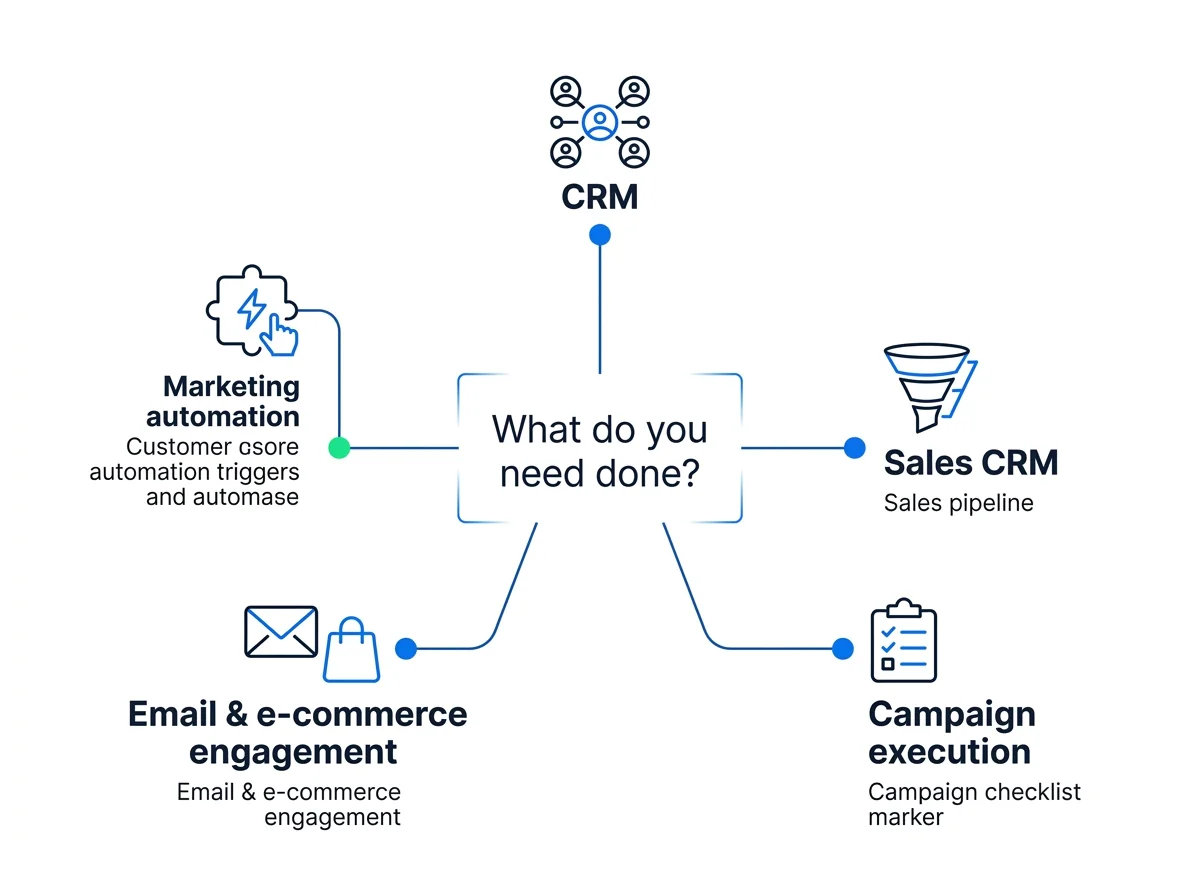
HubSpot alternatives serve very different jobs. Salesforce and Zoho CRM belong in a broad CRM conversation. ActiveCampaign fits a marketing automation shortlist. Pipedrive focuses the decision on sales. Superpage belongs in the campaign-execution conversation. This guide separates those choices so you can build a shortlist around what your team actually needs.
What HubSpot does—and why teams consider alternatives
HubSpot is a broad CRM-centered platform spanning marketing, sales, service, content, and customer data. That breadth matters when several departments need to work around shared customer records rather than maintain separate systems.
A broad suite can be the right choice. It can also be more than a particular team needs. Common reasons to explore alternatives include price, unused functionality, complexity, reporting needs, template preferences, and a desire for more specialized workflows.
The important distinction is what you are replacing:
- A full suite: customer records and the marketing, sales, service, and content workflows around them.
- A specific function: email automation, pipeline management, ecommerce messaging, or funnel creation.
- A way of operating: disconnected campaign tools and handoffs, rather than the central CRM itself.
Choose the workflow you want to improve before choosing the platform you want to move to.
That approach also leaves room to keep HubSpot. If customer management works well but campaign execution feels fragmented, replacing everything may not address the actual bottleneck.
HubSpot alternatives at a glance
This is a fit-based comparison, not a feature-parity scorecard. The categories describe each platform’s role; the shortlist guidance is our editorial judgment about where to begin.
| Platform | Primary role | Shortlist when… | Decision focus |
|---|---|---|---|
| Salesforce | Broad CRM suite | CRM is the operating center | Sales operations and implementation |
| Zoho CRM | Broad CRM | Customer records and pipeline lead the decision | Required cross-team workflows |
| EngageBay | All-in-one CRM alternative | You want a broader platform shortlist | Breadth versus workflow depth |
| ActiveCampaign | Marketing automation | Nurture is the main job | Segmentation and lifecycle messaging |
| Pipedrive / Close | Sales CRM | Sales execution is the priority | Pipeline and follow-up ownership |
| Brevo | Email/CRM-led platform | Messaging leads the requirements | Usage model and total cost |
| Omnisend / Klaviyo | Ecommerce engagement | Shopping behavior drives messaging | Commerce data and retention workflows |
| GetResponse | Marketing and funnel platform | Funnels or webinars anchor acquisition | Conversion-to-nurture handoff |
| Superpage | Campaign execution | You need coordinated campaign-to-opportunity work | Acquisition, conversion, follow-up, and measurement |
How to evaluate a HubSpot alternative
Run the same real workflow through every shortlisted option. For example: an ad click reaches a page, a visitor submits a qualification form, a lead receives follow-up, a meeting is booked, and an opportunity moves through the pipeline. Then assess these eight areas.
- CRM and pipeline: which customer records, ownership rules, deal stages, and sales processes must remain central?
- Automation: what triggers, segments, branches, and exit conditions does your nurture require?
- Pages, forms, and qualification: how will you publish conversion experiences and route different lead types?
- Paid campaign workflow: where do research, ad preparation, launch, and optimization happen?
- Analytics and CRO: do you need campaign reporting, attribution, visitor-session analysis, or all three?
- Ecommerce: are product catalogs, shopping behavior, purchase history, and retention central to the workflow?
- Data flow: which system owns each record, and what events need to move between tools?
- Operating effort: who maintains the system, handles exceptions, and pays for implementation and ongoing usage?
Keep capability statements separate from fit judgments. “The platform supports pipeline management” is a capability. “It suits our sales team” is a judgment that depends on your process. An AI label, integration count, or long feature list does not settle that second question.
The best HubSpot alternatives by job
1. Salesforce: for a CRM-centered operating model
Salesforce is a broad CRM-suite alternative. Our fit judgment: put it on the shortlist when central customer records and sales operations matter more than simplifying a single marketing workflow.
Frame the decision around the customer lifecycle, including how marketing, sales, and service need to work together. Include implementation ownership in the comparison. A broad CRM decision involves more than moving contact fields.
2. Zoho CRM: for customer records and pipeline priorities
Zoho CRM belongs in the broader CRM category. It is a useful comparison point when your replacement decision starts with customer management rather than an email campaign or landing page.
Our fit judgment: define the CRM processes you need first, then map the marketing and service work surrounding them. Keep CRM requirements separate from requirements for the wider operating stack.
3. EngageBay: for an all-in-one shortlist
EngageBay is an all-in-one CRM alternative. Include it when you want to compare broader platforms rather than assemble a shortlist made entirely of specialist tools.
Our fit judgment: use your actual cross-team workflow to weigh breadth against depth. An all-in-one category label is a starting point; your qualification, nurture, sales, and service needs determine fit.
4. ActiveCampaign: for marketing automation
ActiveCampaign is a marketing-automation-led option. It belongs near the top of the shortlist when the central problem is nurture and lifecycle messaging rather than replacing a complete customer-management suite.
Our fit judgment: compare segmentation, branching, message timing, and the transition from marketing to sales. Build the evaluation around a real sequence with clear entry and exit conditions—not just the first email.
5. Pipedrive and Close: for sales-focused CRM
Pipedrive and Close are sales-centric CRM alternatives. Both belong in the conversation when the immediate job is managing pipeline and sales activity.
Our fit judgment: prioritize the daily work of the sales team—ownership, follow-up, deal progression, and visibility. Treat paid acquisition, page creation, and marketing nurture as separate requirements rather than assuming a sales CRM will cover the entire campaign lifecycle.
6. Brevo: for email and CRM-led needs
Brevo is an email/CRM-led alternative. It is a relevant shortlist option when messaging is the main job and budget is an important decision factor.
Our fit judgment: compare total cost at your expected usage, alongside segmentation and the sales handoff. “Cheapest” is not a fixed product category: contacts, sends, users, required functions, and operating work all affect the calculation.
7. Omnisend and Klaviyo: for ecommerce engagement
Omnisend and Klaviyo sit in the ecommerce-engagement category. That makes them different starting points from broad CRM suites or appointment-led campaign platforms.
Our fit judgment: shortlist them when shopping behavior, product data, and retention define the customer journey. Evaluate how commerce events shape messaging and measurement, rather than judging everything through a B2B sales-pipeline lens.
8. GetResponse: for funnel and webinar-led marketing
GetResponse is a marketing-automation option with a funnel and webinar-oriented fit. Include it when those conversion experiences sit at the center of your acquisition strategy.
Our fit judgment: walk through the complete journey from registration or page conversion to nurture and the next commercial step. The handoff matters as much as the front-end experience.
9. Superpage: for campaign execution through opportunity
Superpage supports AI-assisted campaign research, positioning, brand memory, construction, publishing, and optimization across connected tools. It brings campaign work into focus rather than treating the CRM record as the starting point for every decision.
Its campaign capabilities span market intelligence and positioning, Google Ads workflows and keyword research, Meta Ads workflows, and CAPI workflows. Conversion work includes pages and funnels plus forms and lead qualification.
After conversion, Superpage supports contextual email/SMS follow-up, booking, CRM and pipeline visibility, campaign analytics, and AI Voice Agent appointment setting. Its CRO workflow uses actual session recordings, alongside first- and last-touch attribution.
Our fit judgment: consider Superpage when you want fewer handoffs between acquisition, conversion, qualification, follow-up, and opportunity tracking. It is a focused alternative for that operating model—not the best overall replacement for every HubSpot customer.
HubSpot competitors by category
“HubSpot competitors” is broader than “HubSpot alternatives.” A company can compete with one part of HubSpot without being a complete replacement for its suite.
- Broad CRM suites: Salesforce, Zoho CRM, Freshsales, and EngageBay.
- Marketing automation: ActiveCampaign, GetResponse, and Campaigner.
- Sales-focused CRM: Pipedrive, Close, and Nutshell.
- Email and ecommerce engagement: Brevo, Omnisend, Klaviyo, and Drip.
- Campaign execution: Superpage, for coordinated campaign-to-opportunity workflows.
Category overlap is useful for market mapping. Replacement depth is what matters for switching: which jobs will the new platform own, and which jobs will stay elsewhere?
Superpage or HubSpot: which workflow fits?
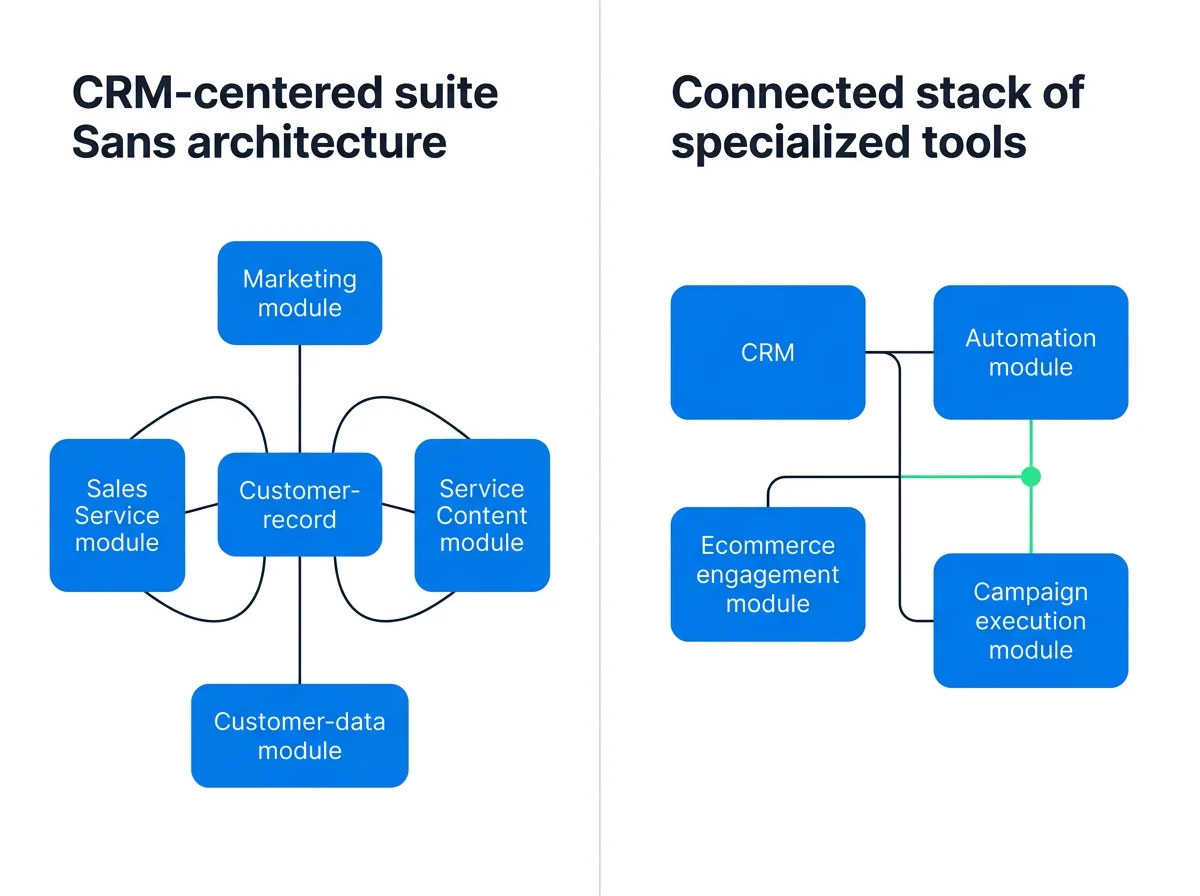
HubSpot fits the broad-suite model: marketing, sales, service, content, and customer management organized around a CRM-centered platform.
Superpage fits the campaign-execution model: research, build, publish, optimize, qualify, nurture, book, and track opportunity progression across connected tools.
When Superpage belongs on your shortlist
- Your team’s main responsibility is launching and improving campaigns.
- You want acquisition, conversion, and follow-up evaluated as one workflow.
- You need campaign analytics, session-based CRO, and attribution alongside pipeline visibility.
- You do not need HubSpot’s full service, CMS, and CRM breadth.
Not a fit for complete suite replacement
Superpage is not a one-for-one replacement for HubSpot’s complete CRM, service desk, CMS, or full suite. Buyers seeking that breadth should compare broad CRM-centered platforms rather than use campaign execution as a proxy for full-suite coverage.
For a closer look at campaign-platform operating models, see GoHighLevel versus Superpage. If your decision is narrower, explore the forms-to-booking comparison with Heyflow or the paid-campaign workflow comparison with Flint.